Things to Know Before Buying FC 27 Coins
Before purchasing LDShop FC 27 coins, please confirm the following:
Unlock the transfer market
Please confirm that your FUT Web App or Companion App has successfully unlocked the Transfer Market before purchasing.
Ensure minimum coin balance
Please confirm that your game account has at least 3,000 FC 27 coins as starting funds. The more coins your account has, the smoother and safer the delivery process usually is. If your account has insufficient coins, we recommend selling unused player cards first or earning more coins through gameplay.
Avoid cross-platform coin purchases within a short period
To reduce account risk, avoid purchasing FC 27 coins on other platforms within 24 hours before using LDShop for a transaction and within 48 hours after the transaction is completed.
Do not log in during delivery
During the coin delivery process, please do not log in to FC 27, FUT Web App, or Companion App to ensure the delivery process proceeds normally.
After your coins arrive
Strengthen account security after the transaction: After completing the transaction, we recommend changing your EA account password immediately and removing unfamiliar devices from your trusted devices list to improve account security.
FC 27 Coins Platforms and Delivery Method
Supported Platforms
⚠️ Please confirm your platform before purchasing:
Always select the platform that matches your Ultimate Team club.
Coin prices and available packages may differ across platforms. FC coins purchased for PlayStation cannot be delivered to an Xbox or PC Ultimate Team club.
FC 27 Coins Delivery Method
Comfort Trade is the default delivery method for FC 27 Coins on LDShop. LDShop handles the coin transfer on your behalf using the account information you submit through the order page. Before delivery, make sure your Web App or Companion App Transfer Market is unlocked and your club has at least 3,000 FC 27 coins as starting funds.
How Comfort Trade Works
Submit your order details
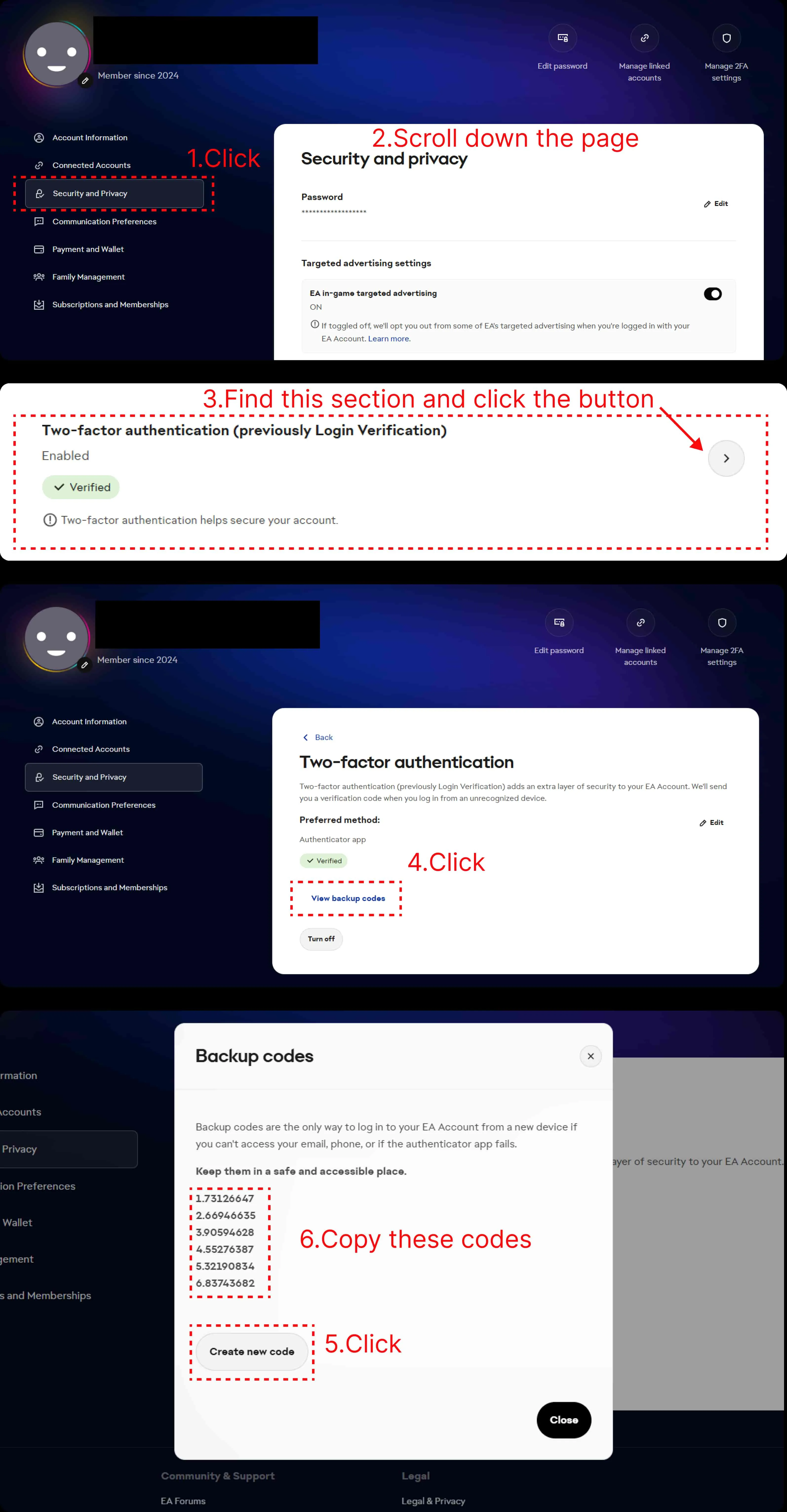
Select the platform linked to your Ultimate Team club and your coin quantity. Follow the order page instructions to provide your email address, EA account password, and 4 valid EA backup verification codes.
Stay logged out during delivery
LDShop completes the coin transfer for you. Remain logged out of FC 27, the FUT Web App, and the Companion App until delivery is complete, and check your order status on the order page.
Check your coins after completion
Once your order is marked complete, log in and confirm your coin balance. Change your EA account password and remove unfamiliar trusted devices. If you need help with the order, contact LDShop's 24/7 customer support.
Keep account details private: Submit your account information and backup codes only through the order page. Delivery time depends on your coin quantity and account readiness; see the Estimated FC 27 Coins Delivery Time table below.
Information Required to Purchase FC 27 Coins
- 1Email address
- 2EA account password
- 34 valid EA backup verification codes
- 4Platform and coin quantity selected in your order
Note: This order process requires 4 valid EA backup verification codes per order. Please submit them as required on the order page — do not send them via public comments, community channels, or any other non-order channel.
Estimated FC 27 Coins Delivery Time
The actual delivery time for FC 27 coins varies based on the quantity purchased. Below are the typical delivery time estimates currently offered:
| Coin Quantity | Typical Delivery Time Estimate |
|---|---|
| Under 500K | Approx. 0.5–1 hour |
| 500K–1M | Approx. 1–2 hours |
| 1M–5M | Approx. 2–5 hours |
| 5M–10M | Approx. 5–24 hours |
Delivery time may be affected by factors such as coin quantity, account status, transfer market availability, and login status during delivery.
If your order is delayed, please wait patiently for delivery to complete; if you do not receive the coins for an extended period, please contact customer service with your order number for assistance.
When to Buy & How to Get the Best Deal
Planning for Champions, a new promo, or a squad rebuild? Have your coins ready before the shopping window you want to use. The aim is to combine a good coin offer with sensible player purchases: a discounted package will stretch less if you spend it on cards during a demand spike.
Weekly upgrades: watch rewards and the weekend cycle
Rivals reward openings can increase the supply of gold cards and SBC items. Check your targets after the Thursday reward drop, and watch for squad sell-offs as players finish their weekend matches. Popular gameplay cards can attract renewed demand before Champions, so compare earlier in the week instead of leaving every upgrade until Friday.
Big promos: prepare coins, then watch card supply
During events such as Black Friday, TOTY, and TOTS, separate getting your balance ready from spending it. Newly released cards can carry a launch premium; compare again as more packs are opened. At the same time, popular SBCs can push required items higher, so a falling promo card does not mean every part of your shopping list is getting cheaper.
Early season: improve the team you are using now
When the market is still settling, start with upgrades that solve a clear problem: a faster defender, a stronger midfielder, or a better finisher. Leave room to change direction as new cards arrive. Waiting may improve the price of a target, but it also means playing without that upgrade in the meantime.
SBC releases: avoid paying for the first popular solution
If a newly released challenge sends particular cards higher, check alternative eligible items and what you already own. For a challenge with time remaining, revisit prices after the initial rush. For one close to expiry, price the entire remaining requirement before committing coins or submitting valuable players.
Make the LDShop offer work for your order
LDShop offers 10% extra coins on packages other than 5K and covers the 5% EA Transfer Market delivery tax. Check whether the displayed coin total already includes the bonus. New customers can also check eligibility for the 15% first-purchase coupon; compare the final checkout total and the listed conditions.
Practical approach: shortlist your cards, check their recent price history and current listings on your platform, then arrange delivery ahead of the window you want to use. Reward days and promo launches are times to watch, not guaranteed market lows.
How Much FC Coins Should You Buy?
For a small gap, a targeted top-up makes sense. For several upgrades, work out the cost of the lineup before choosing a larger balance. These planning ranges help match an amount to a job; they are not fixed prices for an FC 27 squad.
| Coin Budget | Best Use | How to Spend It |
|---|---|---|
| 50K–100K | A focused top-up | Address a weak position, buy the missing items for a chosen SBC, or finish a budget lineup. Check the exact target cost first; avoid spreading a small balance across a full rebuild. |
| 200K–500K | Several upgrades around your existing team | Build around the useful untradeable cards you already own. Compare the improvement from a new striker, central midfielder, or defender before putting most of the balance into one name. |
| 1M–2M | A substantial rebuild or a priority player | Compare two plans: one expensive target, or several changes across the starting XI. Include the supporting cards needed for your formation and chemistry, plus any SBC you already intend to finish. |
| 3M+ | A premium wishlist with known prices | Price each exact version of the Icons, Heroes, or promo cards you want. Some individual items can absorb a large share of this budget; confirm the total before choosing an amount. |
Leave enough balance for the next decision
As an optional starting point, keep 10–15% of your planned coin budget available for a missing link, price movement, or another upgrade. Keep a separate real-money spending limit. Use cards and balances you already have to reduce the amount needed, and only count proceeds from player sales once they arrive.